I frequently use the DEC2BIN functions (and all the related functions for base conversion). It seems that this particular function can't cope with more than 9 digits of binary. For example, DEC2BIN(511) provides "111111111" correctly (9 digits of binary), but DEC2BIN(512) fails, presumably because it needs 10 binary digits. But the help system says that DEC2BIN should be able to cope with 32 bits.
I've attached a simple test file.
Can you see if you can reproduce it?
Thank you,
Jez
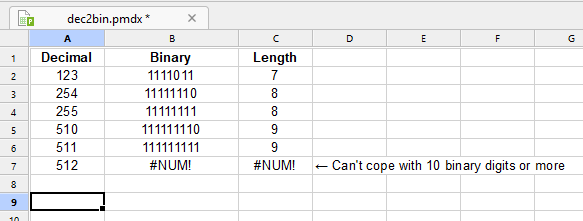
DEC2BIN fails for more than 9 binary digits
- Attachments
-
- dec2bin.pmdx
- (6.96 KiB) Downloaded 4 times
Last edited by JezShed on Thu Sep 03, 2026 6:09 pm, edited 2 times in total.
Re: DEC2BIN fails for more than 9 binary digits
For some reason, attachments aren't working. But hopefully folk can still make sense of my post.
Re: DEC2BIN fails for more than 9 binary digits
DEC2BIN works fine in FreeOffice PlanMaker 2024 (rev F1234.0411)
In FreeOffice DEC2BIN(512) gives "1000000000"
In OfficeNX 2026 DEC2BIN(512) gives "#NUM!"
Another example that proves the new strange limit of 10 binary bits:
In FreeOffice DEC2BIN(-42) gives "11111111111111111111111111010110" (2's complement of -42 shown to 32 bits)
In OfficeNX 2026 DEC2BIN(512) gives "1111010110" (2's complement of -42 when shown to 10 bits)
In FreeOffice DEC2BIN(512) gives "1000000000"
In OfficeNX 2026 DEC2BIN(512) gives "#NUM!"
Another example that proves the new strange limit of 10 binary bits:
In FreeOffice DEC2BIN(-42) gives "11111111111111111111111111010110" (2's complement of -42 shown to 32 bits)
In OfficeNX 2026 DEC2BIN(512) gives "1111010110" (2's complement of -42 when shown to 10 bits)
Re: DEC2BIN fails for more than 9 binary digits
Thank you for reporting this regression and comparing the results with PlanMaker 2024.
I have forwarded the details for further investigation.
As a temporary workaround, =BASE(512,2) can be used for positive values. For negative values, =BASE(MOD(-42,2^32),2,32) produces a 32-bit two’s-complement representation.
I have forwarded the details for further investigation.
As a temporary workaround, =BASE(512,2) can be used for positive values. For negative values, =BASE(MOD(-42,2^32),2,32) produces a 32-bit two’s-complement representation.