In the latest version of SoftMaker Office NX on Android, the three applications (TextMaker, Planmaker, and Presentations) can only open files or save any document files (both from the application or via any file manager on some conditions) from or to the root directory of the device's internal storage, located at /storage/emulated/0/. This error happens even though the storage permission is granted for all apps.
Opening the document on any of its sub directory (for example: /storage/emulated/0/Documents/) will results into this:
- Opening via any file manager just opened an empty document without any contents (just like creating a new document). This happens when the file is above 1 MB and not saved on device's internal storage I've mentioned above
- Opening via the application will produce an error like this example on TextMaker app (Note that it says the file is stored in the /sdcard/ directory, even though actually the file is stored in /storage/emulated/0/Documents/):
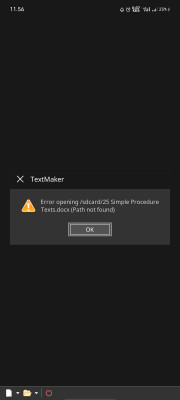
- Error when opening the file inside TextMaker app
Also, saving the document on any sub directory of device's internal storage can lead to error "Disk is full or inaccessible" (even the storage is sufficient and have some space) or even didn't show any warnings at all (as per my current test). The document file is still saved anyway, but it's size is 0B (even tough isn't corrupted) and contains nothing (just like creating a new document) inside the document, and strangely the file is also stored in the root directory of the device's internal storage (/storage/emulated/0/) with the exact same file contents when saved even though I set the save directory to another directory.